0. 为什么会有这篇文章
自从 ChatGPT 发布之后,这两年 LLM 和基于 LLM 的应用越来越多,也出现了 LangChain 和 LlamaIndex 等开发工具,甚至还有一些“低代码”的拖拉拽工具,都非常强大,也都有各自的作用和擅长的领域,而且还有类似 Next Web 等甚至比 ChatGPT 本身还好用的 UI,单纯开发一个聊天机器人似乎已经没有必要。但这却是尝试与 LLM 交互的第一步,我们可以通过开发这个应用来慢慢熟悉如何开发基于 LLM 的其他强大应用。今天我们就来看看如何在 5 分钟内开发一个大语言模型聊天机器人。
本文的代码的开源地址:https://github.com/Kit086/LLMChatDemo
1. 准备工作
- 首先我并没有高性能的 GPU,所以我准备调用免费的 API。Groq(https://groq.com/)提供免费的 API(当然也有付费的版本),他们托管了 llama3 等开源的大语言模型,而且他们的 API 生成 token 的速度极快,但有的网友反馈质量不好,我并没有与其他提供商比较过。注册一个 Groq 账号即可生成 key 来免费使用他们的 API。Groq 也有自己的类似 ChatGPT 的应用,当 ChatGPT 挂了或者抽风的时候可以用它来替代。
- 本文需要 Python 3.8 以上的版本,如果没有安装 Python,可以参考 https://www.python.org/downloads/ 安装。
- 本文使用 poetry 来管理 Python 依赖,所以需要安装 poetry。如果没有安装 poetry,可以参考 https://python-poetry.org/docs/ 安装。poetry 的教学并不在本文的范围内,所以请自行查阅文档。您可也选择您喜欢的其他工具。
2. 创建项目
运行以下命令:
# 创建项目
poetry new LLMChatDemo

# 切换到项目目录
cd LLMChatDemo

# 添加依赖
poetry add gradio
poetry add llama-index
poetry add llama-index-llms-groq
3. 开发
在当前路径下会发现类似这样的目录结构:
LLMChatDemo
├── pyproject.toml
├── README.md
├── LLMChatDemo
│   └── __init__.py
└── tests
    └── __init__.py
首先在当前路径下创建一个 config.json 文件,填入从 groq 申请到的 key,以避免直接将它编码到代码中:
{
    "groq_apikey": "<your-groq-api-key>"
}
我建议你立刻在当前路径下创建一个
.gitignore文件,将config.json添加到其中,以避免将来想把代码提交到某些 git 仓库时泄露 key。
我们可以使用 VSCode 等工具打开当前路径,在包含 __init__.py 的 LLMChatDemo 目录下创建一个 chatbot_demo.py 文件,然后引入所需的包:
from llama_index.llms.groq import Groq
from llama_index.core.llms import ChatMessage
import gradio as gr

import json
llama_index 用于调用 groq 的 api,构建对话的消息等,gradio 用于构建一个简单的 web 界面,json 用于读取配置文件。
然后我们读取配置文件:
with open('config.json', 'r') as file:
    config = json.load(file)
可以看到我的配置文件的地址使用的是相对路径,因为我打算在项目路径下运行这个程序,我的 config.json 文件也是在项目路径下。如果您 cd 到了子目录下,运行出现了问题,请注意查看报错信息。
接着我们创建一个 Groq 对象,命名为 llm:
llm = Groq(model="llama3-70b-8192", api_key=config["groq_apikey"])
可以看到我使用的是 llama3-70b-8192 这个模型,这是 Meta(原 Facebook)刚开源的一个 70 亿参数的模型,在目前的开源 LLM 中数一数二。可以根据自己的需求选择 groq 提供的不同的模型。
然后我们创建一个 chatbot 函数,用于处理用户输入的消息:
def predict_llm(message, history):
    history_llama_index_messages = [ChatMessage(role="system", content="Please give your answer and translate it into Chinese like a Chinese native speaker.")]

    for human, ai in history:
        history_llama_index_messages.append(ChatMessage(role="user", content=human))
        history_llama_index_messages.append(ChatMessage(role="assistant", content=ai))

    history_llama_index_messages.append(ChatMessage(role="user", content=message))

    resp = llm.stream_chat(history_llama_index_messages)

    partial_message = ""
    for chunk in resp:
        partial_message = partial_message + chunk.delta
        yield partial_message
这个函数接受两个参数:
- message:用户输入的消息,也就是用户刚刚输入的新消息。
- history:历史消息,包含了用户和机器人的对话记录。因为我希望我们的这个 Chatbot 拥有记住某一次对话的上下文的能力,所以我将这次对话已经互相发送过的历史消息传入这个函数。
再来看函数内部:
history_llama_index_messages是一个列表,用于存储历史消息,其中包含了用户和机器人的对话记录。我们首先将系统消息,即role="system"的这条ChatMessage,添加到列表中。系统消息就像是上帝给你的提示,在这里你扮演 llama3 的上帝,安排它做任何事情。这里我安排它回复之后再将回复翻译成中文,方便我们看;- 然后,每次用户发出新消息,都会调用一次这个函数,我们都会重新构造一次
history_llama_index_messages,将系统消息,历史消息和用户新消息按顺序添加到列表中,这个for循环就是在做这个事情,它将历史消息记录按照 llama_index 的格式添加到列表中; history是多个元组的集合,每个元组有一个human和ai,分别是人类发送给 AI 的消息和 AI 的回复。人类发送的消息,我们用role="user"的ChatMessage来构建;AI 的回复,我们用role="assistant"的ChatMessage来构建;- 然后我们才将用户新发送的消息以
role="user"的ChatMessage添加到列表中; - 然后我们调用
llm.stream_chat方法,将历史消息传入,获取 llama3 的回复。这里我们用的是 stream chat,AI 就会像打字一样一个一个字打出来,就像 ChatGPT 一样。但是由于 groq 实在是太快了,你可能感受不太到。我们拿到 AI 的回复response; - 最后我们将 AI 的回复
response按照delta字段的内容,一个一个字的返回给用户。
最后我们使用 Gradio 来构建一个简单的 web 界面:
gr.ChatInterface(
    predict_llm,
    title="Kit's Chatbot",
    description="This is a demo.",
    examples=["你好!", "为什么周树人打了鲁迅,但是鲁迅没有选择用微信报警,而是在 twitter 上发了个帖子来抗议呢?", "在中国,高考满分才 750,怎么才能考 985?"]
    ).launch()
这里我们使用了 Gradio 的 ChatInterface,传入了我们刚刚定义的 predict_llm 函数,以及一些参数。这里的 title 和 description 是界面的标题和描述,examples 是一些例子,用于展示给用户,让用户知道如何和 Chatbot 交互。
这里我准备了几个强有力的问题来测试 llama3 的能力,你也可以准备一些问题来测试 llama3 的能力。
现在我们可以运行这个程序了。但如果你希望把程序跑起来并让你的朋友也能访问到,你可以稍微修改一下代码:
.launch(share=True)
这样 Gradio 就会自动帮你生成一个网址,你可以将这个网址分享给你的朋友,让他们也能和你的 Chatbot 交流。
4. 运行
依然是在项目的根目录,也就是 config.json 所在的目录,运行以下命令:
# 激活 poetry 环境
poetry shell

# 运行程序
python .\LLMChatDemo\chatbot_demo.py
5. 使用
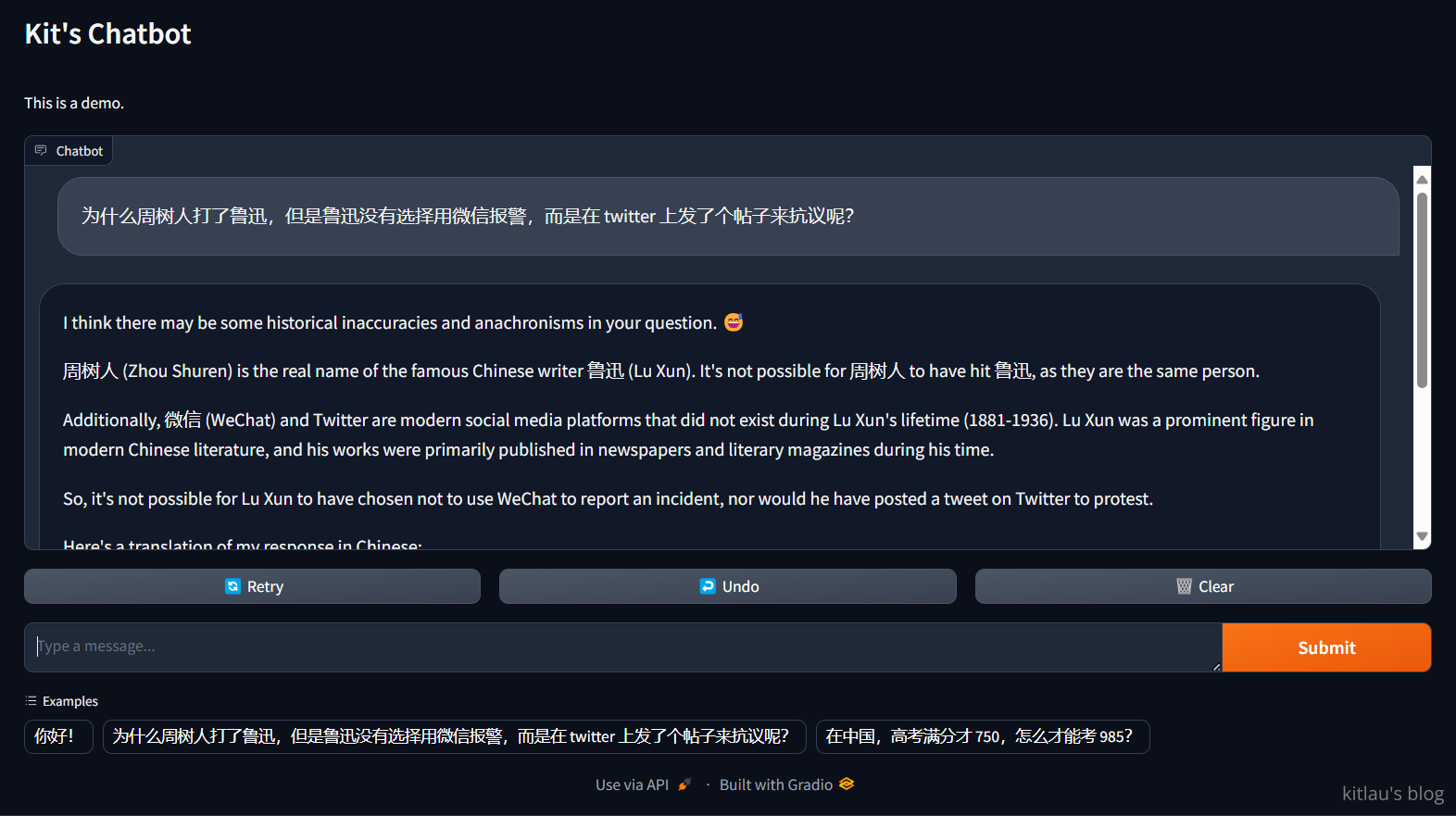
上面我询问了它 为什么周树人打了鲁迅,但是鲁迅没有选择用微信报警,而是在 twitter 上发了个帖子来抗议呢?,这是一个强大的问题,我想看看 llama3 能不能回答这个问题。这是它的答案的中文版:
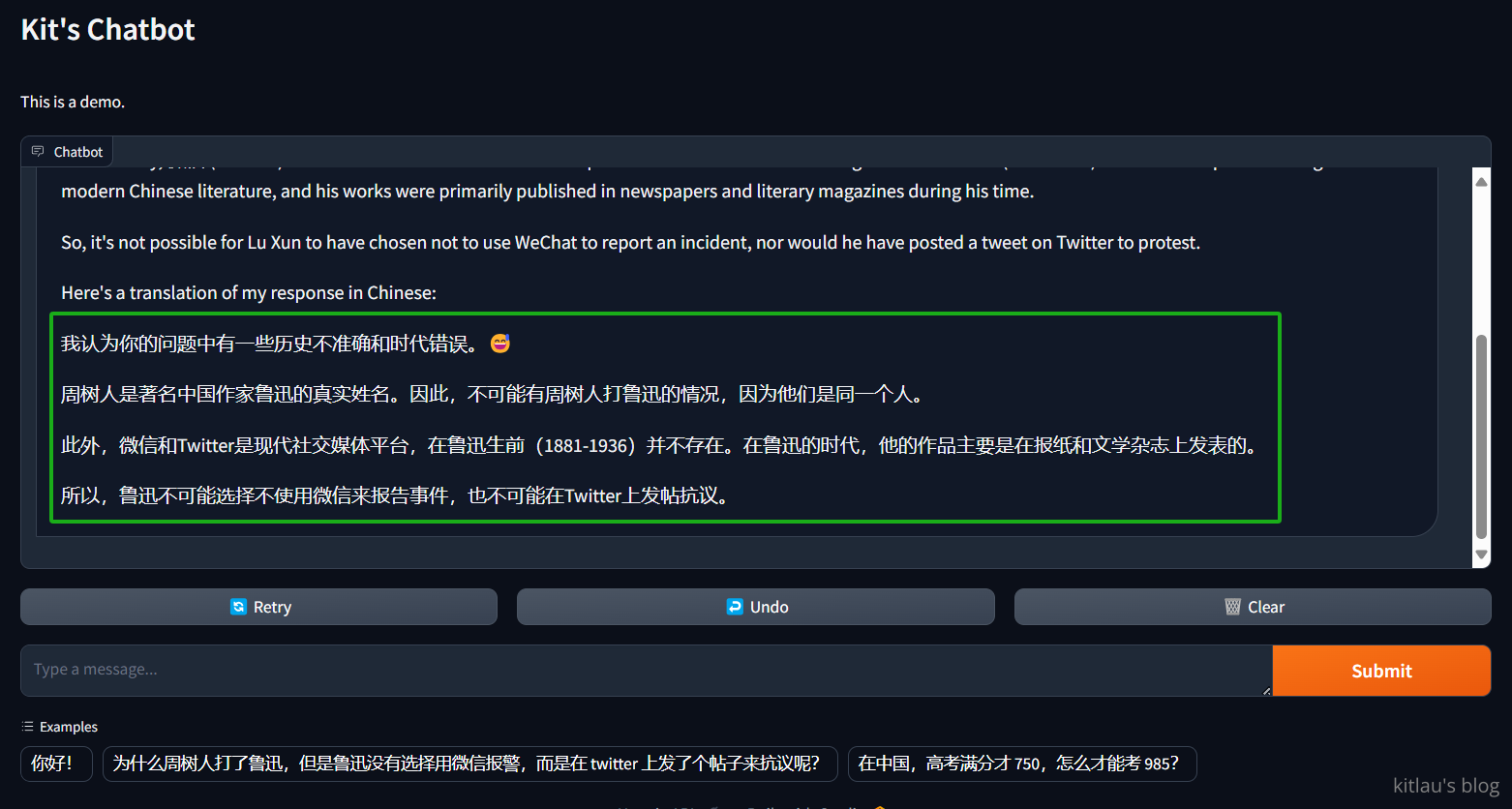
它成功破解了我的问题,这是一个非常强大的回答。我想 llama3-70b 会是一个非常好的 LLM,我会继续使用它。
然后我尝试第二个问题 在中国,高考满分才 750,怎么才能考 985?,这是它的回答:
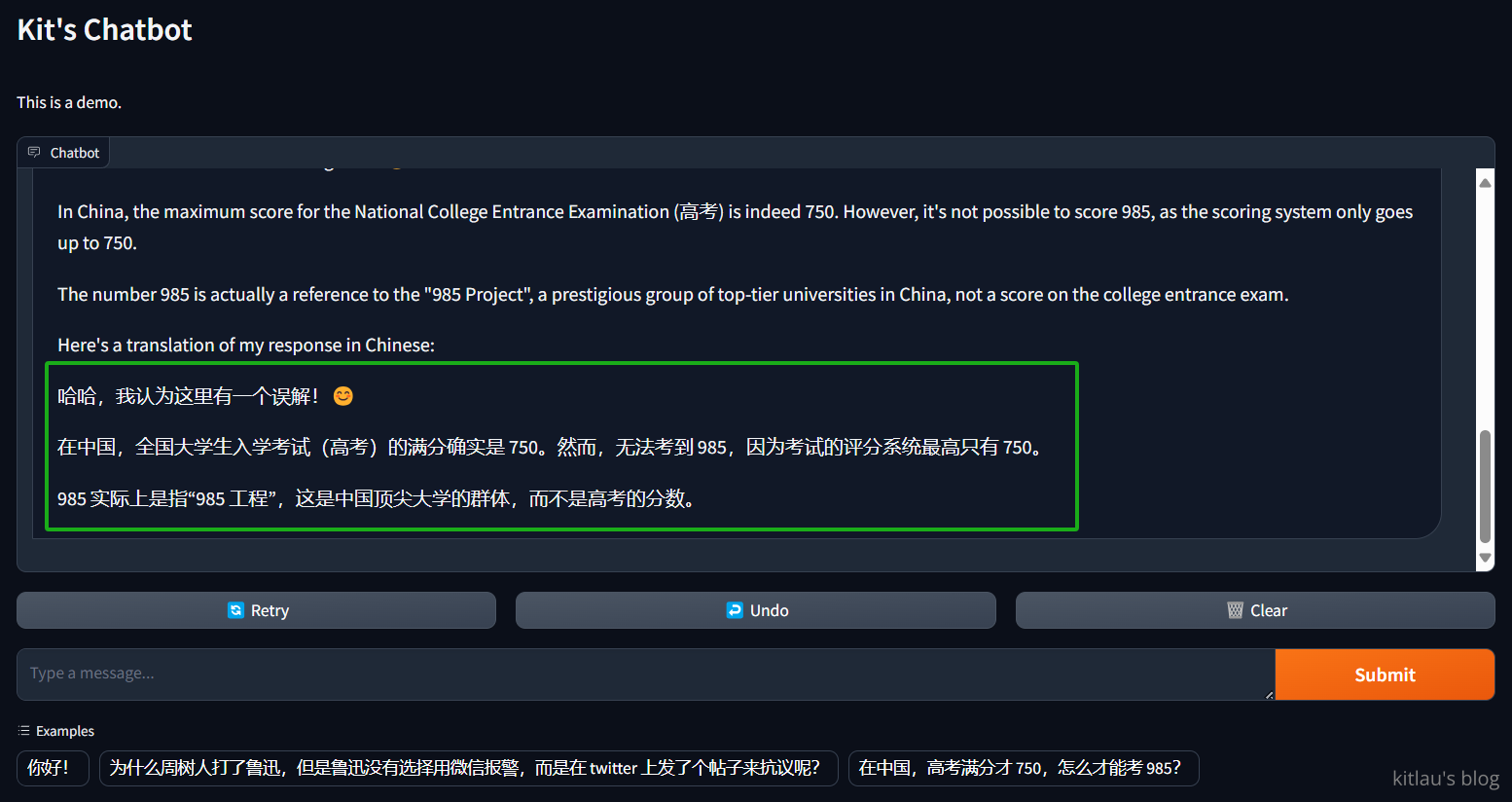 它再次破解了我的问题,太强了!
现在我们测试以下它是否还记得我们问过的问题:
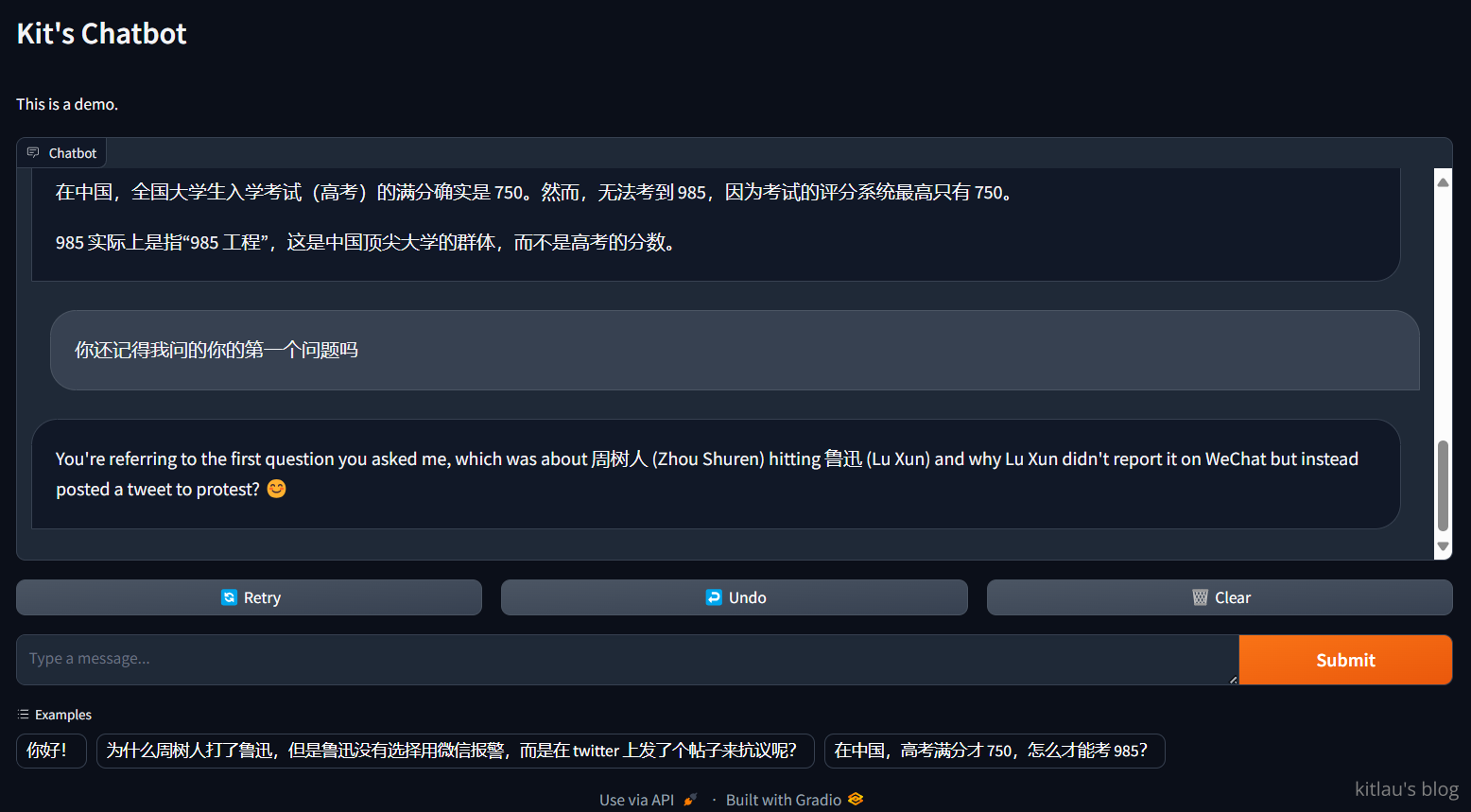
虽然它忘记了把回答翻译成中文,但它还是记得我们问过的问题。这可能是我的系统消息没写好,让它产生了误解,也可能是别的原因。
这篇文章结构清晰、逻辑严谨,为读者提供了一个快速构建LLM聊天机器人的实用指南,尤其适合希望入门LLM开发的开发者。文章的核心价值在于将复杂的模型调用和交互逻辑拆解为可操作的步骤,同时兼顾了开发实践中的安全性和可扩展性。以下是对文章的详细分析及建议:
优点与闪光点
实践导向与低门槛设计
通过明确的代码示例和依赖安装说明,读者可以快速复现项目。使用Groq的免费API和开源工具(如poetry、Gradio)显著降低了硬件和经济门槛,尤其适合无GPU资源的开发者。这种“五分钟上手”的设计符合当前低代码/半自动开发的主流趋势。
对安全意识的强调
文中特别指出需通过
config.json管理API密钥,并建议添加.gitignore防止密钥泄露。这种对安全细节的重视在教程类文章中较为少见,体现了作者对生产环境实践的深刻理解。模型能力的直观展示
通过设计幽默且具挑战性的测试问题(如“周树人打鲁迅”的悖论问题),既展示了模型的逻辑推理能力,又以轻松的方式验证了LLM的上下文理解能力。这种“寓教于乐”的测试方式能有效激发读者兴趣。
开源协作与扩展性
提供GitHub仓库链接便于读者直接参与代码迭代,同时结尾暗示了聊天机器人可作为更复杂应用的起点,为后续进阶开发埋下伏笔。
可改进之处
依赖库的原理说明不足
stream_chat的流式响应原理),可能导致新手仅停留在代码复制层面。建议补充这些工具的核心作用(如Gradio如何将函数包装为Web界面)。llama_index-llms-groq与原始Groq API的兼容性,可能引发读者对依赖稳定性的疑问。Groq模型托管的准确性存疑
llama3-70b-8192需验证:Llama3官方版本中并无“70b-8192”这一参数组合(当前版本为70B和8B),可能引发混淆。建议确认Groq支持的模型名称,或补充说明该名称的含义(如上下文长度8192 token)。系统消息设计的优化空间
"请用中文回答"),或通过response_format参数控制输出语言。system消息的前置条件,而非附加要求。错误处理与健壮性缺失
try-except块。config.json路径硬编码为相对路径,若读者在子目录运行程序可能出现错误,建议通过os.path动态定位文件路径。测试案例的现实性建议
延伸建议
进阶方向
llama_index.core.memory)。性能优化
伦理与合规性讨论
ChatMessage的role="system"添加内容安全提示)。总结
文章成功实现了快速入门的核心目标,代码示例和实践步骤对新手极具参考价值。若能修正模型托管的描述、补充依赖原理说明,并增强错误处理逻辑,将更具权威性和实用性。期待作者后续分享更多关于LLM应用优化的深度内容。
这篇文章详细介绍了如何在Windows系统上使用llama.cpp部署本地的LLM模型。作者从准备环境、下载模型到配置和运行,一步步引导读者完成整个过程,并提供了实际示例和遇到的问题及解决方案。
首先,关于部署过程中的关键步骤,文章提到使用poetry进行依赖管理,这是一个很好的选择,因为poetry能够很好地隔离项目环境,避免版本冲突。在模型选择上,作者推荐了llama.cpp,这是一个轻量级的实现,特别适合资源有限的开发者或者需要快速部署的场景。
在优化建议方面,可以考虑以下几点:
此外,实际应用中可能会遇到一些挑战,例如:
最后,比较其他类似工具如VLLM或FasterTransformer,llama.cpp的优势在于其轻量级和易用性。然而,在支持的模型类型和优化选项上可能稍显不足。对于需要高性能和多模型支持的场景,可能需要考虑其他的框架。
总的来说,这篇文章为开发者提供了一个清晰的指导,帮助他们在本地快速部署LLM模型。希望未来能够看到更多关于llama.cpp在不同应用场景中的案例分析,以及如何进一步优化其性能和功能。
非常感谢您分享这篇关于如何在5分钟内开发一个大语言模型聊天机器人的博客。这篇文章提供了一个简单而有效的方法来开发一个基于LLM的聊天机器人,并且给出了详细的步骤和代码示例。
博客的闪光点在于它提供了一个简洁明了的教程,让读者能够快速上手并开发自己的聊天机器人。通过使用Groq提供的免费API和LLM模型,作者展示了如何构建一个具有上下文记忆能力的聊天机器人。此外,使用Gradio构建一个简单的Web界面,使用户可以与机器人进行交互,这也是一个很好的补充。
然而,我注意到一些可以改进的地方。首先,在整个教程中,作者没有提供关于Groq和LLM模型的详细介绍和说明。对于那些对这些技术不熟悉的读者来说,这可能会造成一些困惑。在介绍这些工具时,提供一些背景知识和说明将有助于读者更好地理解和使用它们。
其次,我建议在代码示例中添加一些注释,以解释每个步骤的目的和功能。这将使读者更容易理解代码,并且可以更好地理解如何根据自己的需求进行定制和修改。
最后,我注意到在示例问题的回答中,有一些翻译错误。这可能是由于系统消息的问题导致的,作者可以在后续的版本中进行修复和改进。
总的来说,这篇博客提供了一个简单而实用的方法来开发一个大语言模型聊天机器人,并且给出了详细的步骤和代码示例。通过改进一些细节,如提供更多的背景知识和说明,添加注释以及修复翻译错误,这篇博客可以更好地帮助读者理解和使用这些技术。非常感谢作者的分享,期待看到更多关于聊天机器人开发的内容。